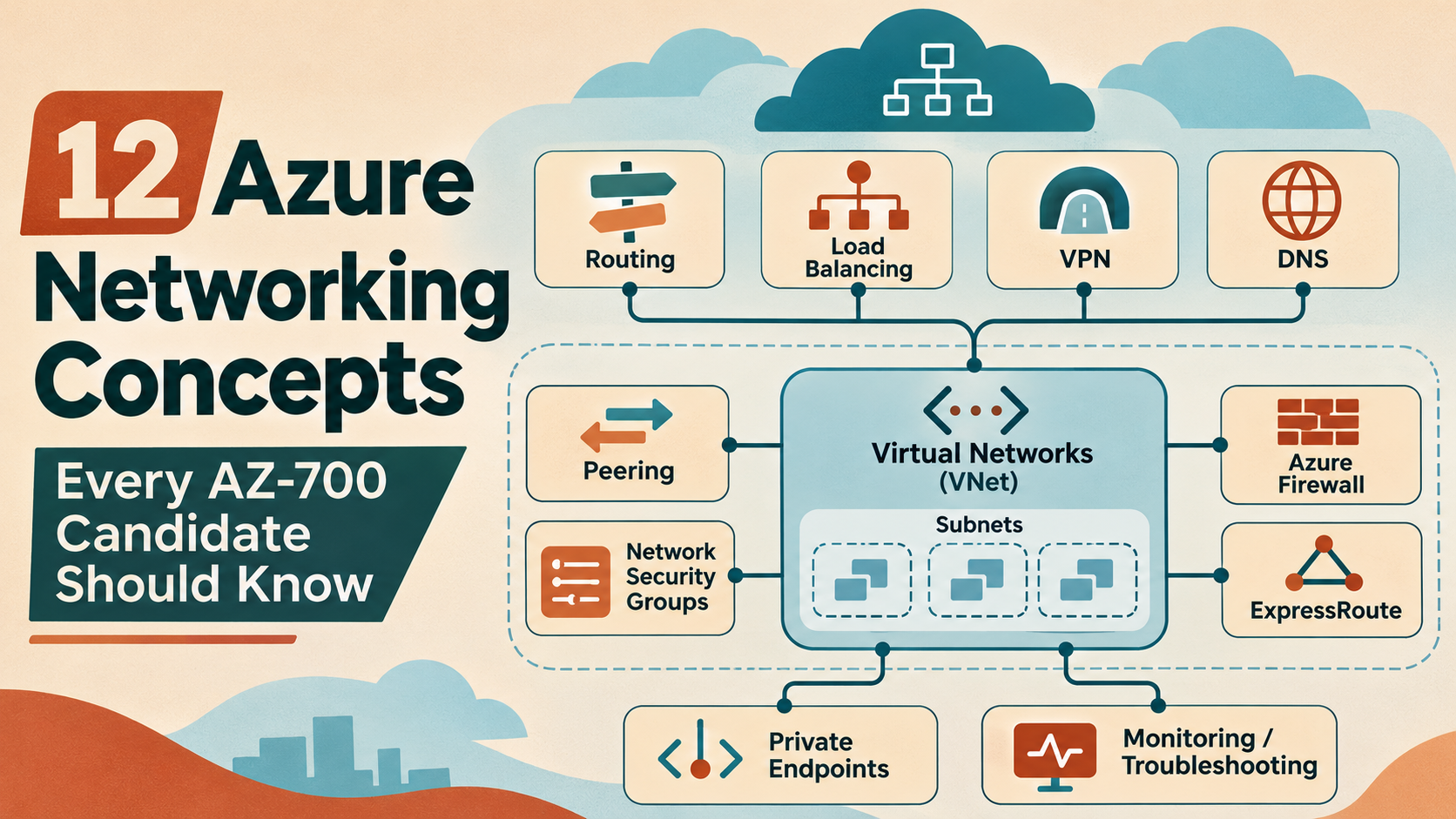
12 Azure Networking Concepts Every AZ-700 Candidate Should Know
A company moves its applications to Microsoft Azure. The application servers are running, the database is available, and the virtual networks have been configured. However, employees working remotely cannot access the application, and some internal services cannot communicate with each other.
The problem could involve routing, DNS, firewall rules, virtual network peering, or hybrid connectivity.
This is why Azure networking requires more than knowing how to create a virtual network.
The Microsoft Azure AZ-700 exam focuses on designing, implementing, securing, and troubleshooting networking solutions that support reliable cloud infrastructure.
Candidates need to understand how Azure networking services work together and how to select the appropriate solution for different technical requirements.
This guide explains 12 essential Azure networking concepts with practical examples, service comparisons, and a troubleshooting exercise.
Understanding the Microsoft Azure AZ-700 Certification Exam
The AZ-700 examination, Designing and Implementing Microsoft Azure Networking Solutions, leads to the Microsoft Certified: Azure Network Engineer Associate certification.
It evaluates knowledge of cloud networking architecture, hybrid connectivity, application delivery, private access, and network security.
According to the examination objectives effective July 27, 2026, the exam contains five major domains.
| Exam Domain | Weight |
|---|---|
| Core Networking Infrastructure | 25–30% |
| Connectivity Services | 20–25% |
| Application Delivery Services | 15–20% |
| Private Access to Azure Services | 10–15% |
| Network Security Services | 15–20% |
Core networking infrastructure and connectivity services collectively represent 45–55% of the examination objectives.
However, candidates should study every domain because real networking problems frequently involve several services.
1. Azure Virtual Network (VNet)
Azure Virtual Network is a foundational networking service that allows cloud resources to communicate within a logically isolated environment.
Administrators can define address spaces, create subnets, configure routing, and apply security controls.
For example, an organization might create a virtual network containing separate subnets for web servers, application servers, and databases.
Example VNet Design
| Component | Address Range | Purpose |
|---|---|---|
| Virtual Network | 10.20.0.0/16 | Overall network |
| Web Subnet | 10.20.1.0/24 | Web servers |
| Application Subnet | 10.20.2.0/24 | Business applications |
| Database Subnet | 10.20.3.0/24 | Database workloads |
Separating workloads makes network organization easier and supports different routing and security requirements.
However, subnet separation alone does not automatically block communication. Appropriate network security controls must also be configured.
AZ-700 focus: Understand VNet design, address spaces, subnet delegation, network segmentation, and resource connectivity.
2. IP Addressing and Subnetting
IP addressing allows devices and services to communicate across networks.
Subnetting divides larger address spaces into smaller networks, helping administrators organize infrastructure and plan capacity.
Azure networking engineers should understand IPv4, IPv6, CIDR notation, public and private addresses, and address space planning.
Azure Subnet Address Capacity
Azure reserves five IPv4 addresses in every subnet.
| CIDR | Total Addresses | Usable Azure Addresses |
|---|---|---|
| /24 | 256 | 251 |
| /25 | 128 | 123 |
| /26 | 64 | 59 |
| /27 | 32 | 27 |
| /28 | 16 | 11 |
For example, a /27 subnet contains 32 addresses, but only 27 are available for resource assignment.
Why Address Planning Matters
Consider an organization connecting an on-premises network to Azure.
If both environments use overlapping address ranges, routing may become complicated and require additional network design or translation mechanisms.
Planning non-overlapping address spaces early can help prevent these problems.
AZ-700 focus: Practice subnet calculations, address planning, and identifying overlapping network ranges.
3. Virtual Network Peering
Virtual network peering connects separate Azure virtual networks through private IP connectivity.
Peered VNets communicate over the Azure backbone rather than needing to exchange traffic across the public internet.
Peering can connect virtual networks within the same Azure region or across supported regions.
Practical Example: Hub-and-Spoke Design
A company operates several applications that need access to shared network services.
Instead of placing every application inside one VNet, the company creates separate spoke networks and a central hub.
             Hub VNet
          Shared Services
           /          \
          /            \
    Spoke VNet A    Spoke VNet B
     Application      Database
The hub may host shared connectivity or security services.
One important limitation is that VNet peering is not automatically transitive.
If Spoke A connects to the hub and Spoke B connects to the hub, this does not automatically establish all required communication between the spokes.
Additional routing or connectivity configuration may be necessary.
AZ-700 focus: Understand regional peering, global peering, gateway transit, forwarded traffic, and non-transitive connectivity.
4. Azure Routing and Network Address Translation
Routing determines how traffic travels between Azure resources, connected networks, and external destinations.
Azure automatically creates system routes, but administrators can configure User-Defined Routes (UDRs) when a different forwarding path is required.
Important Routing Components
| Component | Purpose |
|---|---|
| System Routes | Provide default routing behavior |
| User-Defined Routes | Customize forwarding paths |
| Route Tables | Organize UDR configurations |
| BGP Routes | Support dynamic route exchange |
| NAT Gateway | Provides managed outbound source NAT |
Practical Example
An organization requires traffic leaving an application subnet to pass through a centralized firewall.
A user-defined route can direct the relevant traffic toward the firewall when the network architecture supports that design.
Administrators must verify that the next hop is reachable and that return traffic follows an appropriate path.
NAT Gateway addresses a different requirement by providing scalable outbound connectivity for supported subnet resources.
AZ-700 focus: Learn effective routes, longest-prefix matching, next-hop selection, BGP propagation, and outbound connectivity.
5. Azure DNS and Name Resolution
DNS translates domain names into IP addresses so users and applications can locate network services.
Azure supports both public and private DNS scenarios.
Public DNS is used for publicly accessible domain records, while private DNS supports name resolution within connected private networking environments.
Important DNS Concepts
| DNS Feature | Primary Purpose |
|---|---|
| Public DNS Zone | Manages public domain records |
| Private DNS Zone | Manages private name resolution |
| VNet Link | Makes a private DNS zone available to a VNet |
| Custom DNS Server | Provides organization-managed resolution |
| DNS Private Resolver | Supports managed DNS resolution and forwarding |
Practical Example
A virtual machine needs to connect to a storage service through a private endpoint.
The network route is available, but the application still resolves the service name to an unexpected address.
This may indicate an incorrect private DNS zone configuration or missing virtual network link.
Fixing routing would not necessarily solve the problem.
AZ-700 focus: Understand private DNS zones, record management, DNS forwarding, and hybrid name resolution.
6. Azure VPN Gateway
Azure VPN Gateway supports encrypted connections between Azure networks, on-premises infrastructure, and remote users.
It is commonly used when organizations need secure connectivity over public networks.
VPN Connection Types
| Connection Type | Typical Use |
|---|---|
| Site-to-Site VPN | Connects an office network to Azure |
| Point-to-Site VPN | Connects individual remote users |
| VNet-to-VNet VPN | Connects Azure virtual networks through VPN |
| Active-Active Configuration | Supports gateway redundancy |
Practical Example
A company has an office network containing internal business applications.
It wants to extend connectivity to workloads hosted in Azure without immediately purchasing dedicated private connectivity.
A Site-to-Site VPN can provide an encrypted connection between the office and its Azure VNet.
The organization must configure compatible VPN parameters, address spaces, gateway resources, and routing.
AZ-700 focus: Study IPsec, IKE, authentication, gateway configuration, BGP, high availability, and VPN troubleshooting.
7. Azure ExpressRoute
Azure ExpressRoute provides private connectivity between enterprise infrastructure and Microsoft cloud services through supported connectivity providers.
Unlike a conventional internet-based VPN, ExpressRoute connectivity does not rely on traffic traversing the public internet.
This can be useful for organizations with demanding bandwidth, connectivity, and operational requirements.
ExpressRoute vs. VPN Gateway
| Feature | VPN Gateway | ExpressRoute |
|---|---|---|
| Connectivity | Uses public-network transport | Uses private provider connectivity |
| Encryption | Supports encrypted VPN tunnels | Not encrypted by default |
| Common use | Hybrid and remote connectivity | Enterprise private connectivity |
| Deployment | VPN configuration | Provider and circuit arrangements |
Practical Example
An enterprise regularly transfers large amounts of business data between a data center and Azure.
ExpressRoute may provide a suitable connectivity model, depending on the organization's requirements and available provider services.
However, private connectivity does not automatically mean end-to-end encryption.
Additional encryption controls may still be necessary.
AZ-700 focus: Learn ExpressRoute circuits, peering, gateways, redundancy, routing, and connectivity models.
8. Azure Virtual WAN and Hub-and-Spoke Architecture
Azure Virtual WAN is a managed networking service that helps organizations connect branch offices, remote users, virtual networks, and on-premises infrastructure.
It uses managed virtual hubs to simplify large-scale connectivity.
A traditional hub-and-spoke design follows a related architectural approach, but organizations manage more of the connectivity components themselves.
Practical Example
A company operates branch offices across several regions.
Each office needs access to central business applications and shared security services.
Instead of maintaining numerous independent connections, the company can evaluate Virtual WAN to organize connectivity through managed hubs.
Virtual WAN also supports integration with VPN and ExpressRoute services.
AZ-700 focus: Understand virtual hubs, hub routing, branch connectivity, secured hubs, and routing intent.
9. Load Balancing and Application Delivery
Load balancing distributes traffic across available resources to improve application availability and scalability.
Azure offers several services for different application delivery requirements.
Comparing Application Delivery Services
| Service | Main Function |
|---|---|
| Azure Load Balancer | Layer 4 TCP and UDP traffic distribution |
| Application Gateway | Regional Layer 7 HTTP and HTTPS management |
| Azure Front Door | Global application delivery for HTTP and HTTPS |
| Traffic Manager | DNS-based traffic distribution |
Practical Example
A company runs a web application for users in several countries.
Azure Front Door may be suitable for global HTTP traffic management.
An internal application requiring TCP load balancing across virtual machines may instead use an internal Azure Load Balancer.
Selecting the correct service depends on traffic protocols, geographic requirements, security needs, and application architecture.
AZ-700 focus: Understand backend pools, health probes, listeners, routing rules, TLS, and session persistence.
10. Azure Private Link and Private Endpoints
Private connectivity reduces the need to expose supported Azure services through public network interfaces.
Azure Private Link supports private access to services through private endpoints.
A private endpoint uses a private IP address within an Azure VNet.
Private Endpoint vs. Service Endpoint
| Feature | Private Endpoint | Service Endpoint |
|---|---|---|
| Addressing | Uses a private IP | Accesses the service's public endpoint |
| DNS | Often requires private DNS configuration | Generally uses standard service resolution |
| Hybrid access | Possible through suitable connectivity | Primarily VNet-based access |
| Public access | Controlled separately | Service still has a public endpoint |
Practical Example
An application needs to access a storage account without exposing that communication through a publicly accessible service endpoint.
A private endpoint can provide a private connection to the supported service.
However, administrators must also ensure that DNS resolution directs clients toward the intended private IP.
AZ-700 focus: Understand Private Link, private endpoints, service endpoints, private DNS, and public access restrictions.
11. Azure Network Security
Network security controls which systems can communicate and how traffic is inspected.
Azure provides multiple security services designed for different protection requirements.
Important Azure Security Services
| Service | Main Purpose |
|---|---|
| Network Security Group | Filters inbound and outbound network traffic |
| Application Security Group | Groups network interfaces for security rules |
| Azure Firewall | Provides centralized traffic filtering |
| Web Application Firewall | Protects web applications against common attacks |
| DDoS Protection | Helps mitigate distributed denial-of-service attacks |
| Azure Bastion | Supports secure administrative VM access |
Practical Example
An organization hosts its application and database in separate subnets.
The database should accept only the traffic required by the application.
NSG rules can restrict communication based on approved addresses, ports, and protocols.
Azure Firewall can provide additional centralized inspection when required by the design.
AZ-700 focus: Understand NSG priorities, effective security rules, firewall policies, network segmentation, and defense in depth.
12. Network Monitoring and Troubleshooting
Azure networking problems can originate from incorrect routing, DNS settings, security rules, gateway configurations, or service availability.
A structured troubleshooting process helps engineers identify the actual cause before changing configurations.
Azure Network Watcher and Azure Monitor provide diagnostic and monitoring capabilities.
Important Troubleshooting Tools
| Tool | Purpose |
|---|---|
| Connection Troubleshoot | Investigates connectivity between endpoints |
| Connection Monitor | Monitors connectivity over time |
| IP Flow Verify | Evaluates whether an NSG rule permits traffic |
| Next Hop | Identifies routing behavior toward a destination |
| Packet Capture | Collects supported packet information |
| Virtual Network Flow Logs | Provides network flow visibility |
Practical Example
An application server cannot connect to a database.
The engineer should first confirm the destination address and DNS resolution.
Next, inspect effective routing and relevant security rules.
If those checks are correct, investigate whether the destination service is listening and responding.
AZ-700 focus: Learn to connect monitoring evidence with routing, DNS, firewall, and service-level problems.
Practical Azure Networking Exercise: Troubleshoot a Connectivity Failure
Consider a fictional company using a hub-and-spoke network.
The application is hosted in Spoke A, while a private database service is accessible through a private endpoint in another network.
Users report that the application cannot connect to the database.
Step 1: Verify Network Architecture
Check the VNet address ranges and subnet configuration.
Confirm that the required peering and forwarding arrangements exist.
If the networks are connected indirectly, remember that peering alone does not provide automatic transitive routing.
Step 2: Check DNS Resolution
Identify the IP address returned for the database service name.
If a private endpoint is expected, confirm that the name resolves to the appropriate private address.
Incorrect DNS configuration can prevent successful communication even when the underlying network path is available.
Step 3: Inspect Routing
Review the effective routes associated with the application workload.
Determine whether traffic is being directed to the intended destination or network appliance.
Step 4: Examine Security Rules
Check relevant NSGs, firewall policies, and service access restrictions.
Use appropriate diagnostic tools to determine whether traffic is being allowed or blocked.
Step 5: Verify the Destination Service
Confirm that the database service is available and accepts the expected connection type.
A successful network path does not automatically guarantee that the application itself is functioning correctly.
Step 6: Document the Root Cause
Record the observed symptoms, investigation steps, identified problem, and resolution.
This creates useful operational knowledge for future troubleshooting.
Lab takeaway: Azure networking problems should be investigated across DNS, routing, security, connectivity, and application availability rather than treating every failure as a firewall issue.
Recommended Eight-Week AZ-700 Study Plan
A structured plan can help candidates connect theoretical knowledge with practical experience.
| Week | Study Focus | Practical Activity |
|---|---|---|
| 1 | VNets and subnetting | Design network address spaces |
| 2 | Peering, routing, and DNS | Evaluate connectivity paths |
| 3 | VPN Gateway | Understand hybrid VPN configurations |
| 4 | ExpressRoute and Virtual WAN | Compare connectivity architectures |
| 5 | Load balancing | Select services for application scenarios |
| 6 | Private Link | Examine private endpoint and DNS integration |
| 7 | Network security | Review NSGs and firewall rules |
| 8 | Troubleshooting and revision | Investigate networking scenarios |
Candidates should spend additional time on core networking infrastructure and connectivity services because these domains have significant examination weight.
Practical exercises involving routing, security rules, and name resolution are particularly valuable.
When using Azure resources for learning, monitor charges and remove unused infrastructure after testing.
Common Mistakes During AZ-700 Preparation
One common mistake is memorizing service definitions without understanding their differences.
Candidates may know that VPN Gateway and ExpressRoute both support hybrid connectivity but struggle to select the correct solution for a business requirement.
Another mistake is assuming that VNet peering automatically provides connectivity between every indirectly connected network.
DNS is also frequently overlooked during private endpoint troubleshooting.
Candidates should avoid treating networking security as a single firewall configuration. NSGs, routing, private access, and application-layer security all contribute to network protection.
The most useful preparation connects architecture decisions with their operational consequences.
Conclusion
Azure networking involves more than connecting cloud resources.
Virtual networks and subnetting establish the network foundation. Peering, routing, and DNS determine how services discover and communicate with one another.
VPN Gateway, ExpressRoute, and Virtual WAN support hybrid and distributed connectivity.
Load balancing improves application delivery, while Private Link and network security services help organizations control access.
Monitoring and troubleshooting complete the operational picture by helping engineers investigate unexpected behavior.
The practical connectivity exercise demonstrates how multiple networking components contribute to a single application connection.
For AZ-700 candidates, the most valuable skill is understanding why a networking solution works, when to use it, and how to investigate it when something goes wrong.
Combining technical knowledge with realistic networking scenarios provides a stronger foundation for both certification preparation and cloud networking responsibilities.
Frequently Asked Questions
1. What Are the Most Important Topics for AZ-700?
Virtual networks, subnetting, routing, DNS, VPN Gateway, ExpressRoute, Virtual WAN, load balancing, private endpoints, security, and troubleshooting are important preparation areas.
2. Is AZ-700 Difficult for Beginners?
AZ-700 is an associate-level networking examination that benefits from previous experience with IP networking, routing, DNS, security, and cloud infrastructure. Beginners may need additional foundational study.
3. What Is the Difference Between Azure VPN Gateway and ExpressRoute?
VPN Gateway supports encrypted connectivity over public-network transport, while ExpressRoute provides private connectivity through supported providers. ExpressRoute traffic is not automatically end-to-end encrypted.
4. Does AZ-700 Require Programming Skills?
Advanced programming is not a primary requirement. However, familiarity with command-line tools, scripting, and infrastructure automation can support practical Azure networking tasks.
5. How Long Does AZ-700 Preparation Take?
Preparation time depends on previous networking knowledge and cloud experience. An eight-to-twelve-week schedule can provide a starting point, but hands-on readiness is more important than following a fixed timeline.
About the author
- I'm David Mercer, a cloud architecture specialist with 10+ years in enterprise IT. I focus on Azure, AWS, and Google Cloud, explaining complex concepts through practical examples and clear certification guidance. I also share educational content through my work with Cert Mage.
Comments
Join the discussionNo comments yet. Be the first to comment.